I built my own Obsidian Publish
Obsidian Publish is a wonderful addition to Obsidian if you’re looking to publish your vault for the world to see, but I needed something far more custom to handle publishing content from my custom static site generator (SSG).
I debated building a CMS-style web frontend, a TUI, or even going the more traditional CI/CD route (Github Actions style). I landed on building the workflow into Obsidian itself. Here is what I landed on.
The Publish Pipeline Tour
The first feature is the dashboard. This gives me a top-level view of everything in the site like how many posts are published, how many are drafts, and recent deploy history. I can filter and sort all posts by date, title, slug, or type. It’s basically a CMS in obsidian.

The next is the new post option. I pick a slug, choose a type (blog or note), and it scaffolds out a new markdown file with all the frontmatter pre-filled.

Next is the publish tab. When I select a post, I get a summary of its
metadata and a pipeline view:
Check -> Build -> Deploy. Each step has to pass
before the next one unlocks.

The Check Step
The check step validates the post before anything gets built. It parses the frontmatter to make sure everything looks right, scans the content for accidentally committed secrets (though there are no .env files here), verifies that every image referenced in the post actually exists on disk, and counts internal vs external links. If anything is off, the pipeline stops here.
The Build Step
Once checks pass, the build step kicks off the SSG. This runs the
full build.sh pipeline. I’ll save you the details (and I
do NOT recommend doing this…) but essentially it runs a docker
images that does a Pandoc conversion of markdown to HTML, processes
annotations, creates the OG image (more on this in a bit), index pages,
RSS feeds, etc. If the build fails (bad markdown, missing dependencies,
etc.), the error is shown in obsidian and I can triage it without having
to dig around in github actions (when github is even working that
is…)
The Deploy Step
Deploy pushes the built output to a github repo which is configured with Cloudflare pages.
The In-Case-Of-Fire-Break-Glass Step
In case I publish something broken, the rollback button reverts the last deploy commit and force-pushes to the deploy repo so Cloudflare serves the previous version. It shows the commit I’m reverting and how many files were touched so I know what I’m undoing before I confirm.

The SSG
I won’t get into the details of how or why I use a custom static site generator, but a few details worth noting, I have a standard frontmatter (obsidian properties) at the top of every blog I publish that has the following schema:
title: Building A Custom Obsidian Publishing Pipeline
date: 2026-04-10
type: note
slug: custom-obsidian-publish
published: true
description: I built a custom blog publishing CI/CD pipeline that lets me wrote and deploy blogs from obsidian.
tags:
  - ai
  - workflow
  - productivity
These are standardized across all posts which is important as the static site generator builds the entire rest of the website based off of this content.
Image previews
Image previews (also known as og-images) are displayed when content is shared on various platforms. I wanted something unique, not a random AI-generated image. I decided I wanted an old school press release style image. For example, here is the preview image of my recent nodes/proxy blog when sent in Discord.
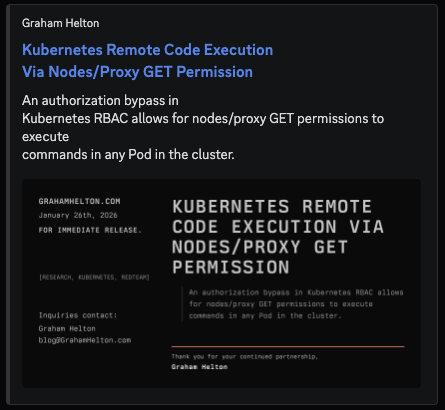
I don’t condone the way I generate this… but if it works…
To generate this the SSG parses the frontmatter of each post, pulls
out the title, date, description,
and tags fields, feeds them into an HTML template styled
like a 1980s press release, and renders it to a 1200x630 PNG with
wkhtmltoimage. The signature line at the bottom even
changes color based on the tags (red for redteam posts,
green for everything else)
title: Kubernetes Remote Code Execution Via Nodes/Proxy GET Permission
date: 2026-01-26
type: blog
slug: nodes-proxy-rce
published: true
description: "An authorization bypass in Kubernetes RBAC allows for nodes/proxy GET permissions to execute commands in any Pod in the cluster."
tags: ["research", "kubernetes", "redteam"]